Using Salesforce geocodes feature in Summer'16 release

In Summer'16 release, salesforce has rolled out much-awaited geocodes feature that allows users to access latitude & longitude co-ordinates on standard addresses fields in few of salesforce objects. Supported objects are : Accounts, Contacts & Leads.
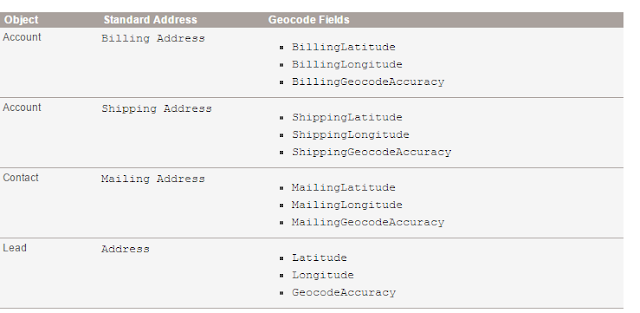


Now, all the existing and new records will have this lat and lon fields autopopulated based on the address provided there. These fields can not be added to layout directly. you would need to create formula to access their values on the page.

Steps to create formula : 
1) Create a new formula field of type Number with 4 decimal places
2) In the formula editor, select fields and select BillingAddressLatitude field to view Billing Address Latitude co-ordinates. 


Likewise, other formula fields can be created to capture longitude and geocodeaccuracy fields.

How do you intend to use these new fields? Share your thoughts


Making external images work in salesforce visualforce pages renderas="pdf"

When you use some external images url in a visualforce page that is being rendered as pdf, you will notice that external images are not getting displayed on the page, instead a "No-image" icon gets displayed.


Solution:
Salesforce PDF generation engine that runs in the background, runs in same security settings as Apex, which means you have to whitelist the image hosting site by going to setup->Security Controls ->Remote site settings


Refresh the page, and here you go!!


May the Sales-FORCE be with you!!


Using field sets to display data in VF page


This is one of the first methods to display dynamic columns/fields on a visualforce page as specified in my previous blogpost.

As you might be aware that almost all standard/custom objects supports field sets. Field sets are introduced to give flexibility to a user/Admin to change the fields that are being displayed in a visualforce page by themselves, without touching the code. This also helps in case you are offering a vf page as part of managed package. Whoever install the package, can control fields-to-be-displayed using field sets used in the vf page.

In the example below, i am going to create a vf page on Account object.
Here is all you need for this:

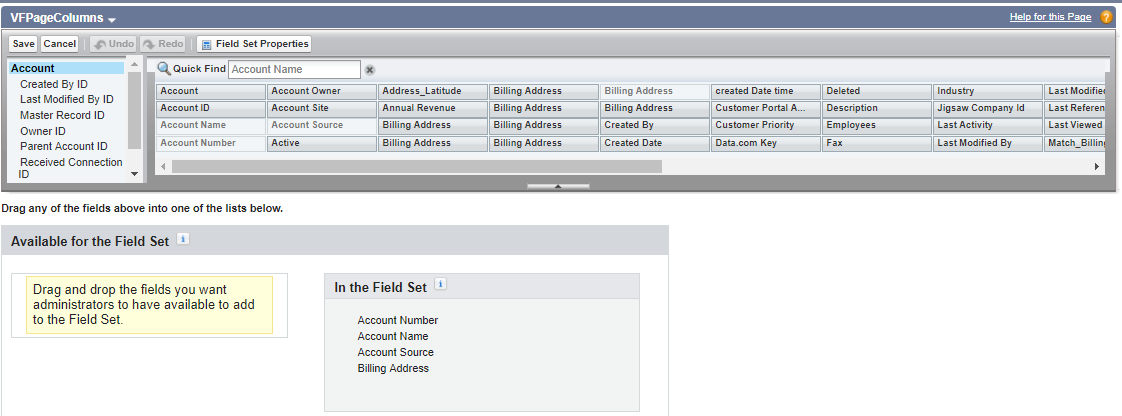
1) Field set on Account. I will call it VFPAGECOLUMNS. you can create it by going to set->Customize->Account->FieldSets


2) Access this field set from your VF page by using. In my case i am using this inside <Apex:repeat> to iterate each field in the field set. 

{!$ObjectType.Account.fieldSets.VFPageColumns}

Here is the complete code:

<apex:page standardcontroller="Account">
    <apex:form>
    <apex:pageblock title="Dynamic columns in Visualforce Page with FieldSet">
        <apex:pageblocksection>
            <apex:repeat value="{!$ObjectType.Account.fieldSets.VFPageColumns}" var="accField">
                    <apex:inputfield value="{!Account[accField]}">
                    </apex:inputfield></apex:repeat>
            </apex:pageblocksection>
        </apex:pageblock>
    </apex:form>

</apex:page>


And the output looks like following. Also. you can also set fields to required in the layout from the field set by double clicking on any field and set it to Required

Showing dynamic fields/columns in VisualForce Page

A lot of times, we choose visualforce pages to override standard view/edit views in salesforce. But one of the drawbacks in choosing this approach is that the client has to rely on a developer to make any changes in the field being displayed on the page or to add a new field in the layout of the visualforce page. 

There are several approach by which we can go for visualforce pages with still having the flexibility for the client or admin to change the fields by themselves without even changing the code. Here are few methods:

1) Using Field Sets
2) Using Reports
3) Using ListViews

Share in comments if you are aware of any other methods to achieve the same.